Showing posts with label Mastering. Show all posts

Thursday, August 29, 2013

Trent Reznor Offers Two Different Mastered Versions of New Album

Nine Inch Nails has been getting a lot of press in recent days now that iTunes is allowing fans to stream the full album before it is officially released, but it's one of the technical details of the release that has me more interested than the actual music.  In response to the infamous "Loudness Wars" (read about it here, if you're unfamiliar), Trent Reznor has elected to make the digital release of his new album available in two different versions.

The first, which will be the version available via iTunes, Amazon, and the other big digital music retailers, is the standard "loud" master that tends to be the standard for mainstream music these days - loud at the expense of dynamics.  The second version, which will be available via NIN.com, will be an "audiophile" master which, while not as loud, preserves the dynamics and represents the music more faithfully.

I applaud Mr. Reznor for this decision and hope other artists will follow.  The only way we're going to dial back from the "turn everything into a brick" mentality, is if larger artists reject it, or at least offer their fans the option to buy a copy with preserved dynamics.

[via Synthtopia]


Tuesday, May 28, 2013

Sample Magic Releases Magic AB Plug-in


Have you ever read about a new plug-in and thought, "Why didn't I think of that?!"  Sample Magic's new Magic AB plug-in sounds like one of those plug-ins to me.

When mixing and mastering tracks, it can be especially useful to compare the track you are currently working on with a different track you consider to be a good representation of "professional sound".    Magic AB allows you to compare the mix you are working on in your DAW with up to nine other sound files of mixes you want to use to reference to.

Magic AB is available at the special price of £19.90 (regularly £24.90) for a limited time. Available for Windows (VST, RTAS, AAX) and OSX (VST, AU, RTAS, AAX).

Tuesday, November 15, 2011

Review: Tone2 AkustiX

Product: AcustiX Audio Enhancer
Developer: Tone2
Format: 32 and 64-bit VST and standalone for PC. VST and AU for Mac.
Demo: Demo version (which shuts down after ten minutes of use) on the product page.
Price: $79

Tone2 have made quite a name for themselves with their excellent Gladiator 2, ElectraX, and other synths, but this time out, they've switched things up a bit and presented us with AkustiX, an effect plug-in they describe as an "audio enhancer" designed to help give your mix a more polished sound.

INSTALLATION
Installation of AkustiX comes via a download and standard installer. Once your plug-in is installed, you locate a keyfile you received with your order, and you're good to go!

DOCUMENTATION
The manual for AkustiX comes via a 16-page PDF (only 9 of which contain the actual information). It describes the functions of each portion fairly well, although it could probably stand to go a bit in-depth. Most of the functions are relatively easy to figure out just via experimentation, though, so this isn't a huge deal.

INTERFACE
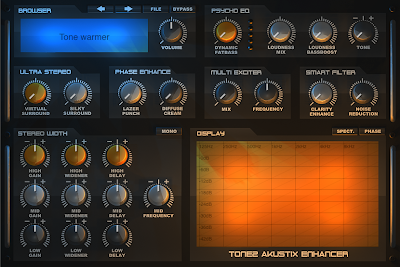
The overall look of AkustiX is very similar to Gladiator 2's with a dark background and a blue preset display, offset with orange and grey elements. All of the controls are nicely sized and labels are easy to read.

The Browser is found in the top left portion of the interface, allowing easy navigation through the presets, file operations (saving/loading presets and banks), and a bypass switch that allows you to A/B the effected and dry signal. A volume control is also found here.

Immediately to the right of that is the first effect block, called the Psycho EQ. This is basically a dynamic EQ that boosts and EQs frequencies in a non-linear way that is supposed to mimic the way human hearing works. The end result is supposed to be a signal that sounds louder without necessarily being all that much louder. There are four controls here: Dynamic Fatbass, Loudness Mix, Loudness Bassboost, and Tone. Dynamic Fatbass is essentially a bass enhancer designed to make a signal sound louder by boosting its bass. It sounds very nice on individual bass and kick tracks, but I found it to get a bit muddy with full mixes unless you're extremely subtle. The Loudness Mix and Loudness Bassboost are made to work together where Loudness Mix controls the overall wet/dry mix of the loudness effect, whereas the Loudness Bassboost specifically controls the bass levels. This was a bit more effective on full mixes, as it allows you to keep the low end a bit more under control. The Tone knob is a simple control for adjusting the overall tonal balance of the signal, allowing you to brighten or muffle the sound as needed. A little bit goes a long way.

On the next row of controls down, you'll find the Ultra Stereo effect, which is divided into Virtual Surround and Silky Surround controls. The Ultra Stereo section is intended to alter the perceived spaciousness and distance of the mix and can also be used to "stereoize" mono mixes. The Virtual Surround parameter allows you to add a decent sense of space so long as you don't over-do it. On the other hand, I found the Silky Surround to be anything but. It tended to destroy the punch in drums and added a strange, almost mechanical/metallic quality to audio at higher settings.

Next to this is the Phase Enhance, which has two controls, Lazer Punch and Diffuse Cream. While these effects are intended to "mask non-lineararities in loudspeakers and simulate a more natural dispersion of sound, I didn't find them terribly useful. Lazer Punch is supposed to add an "analog" type punch to signals, but to my ears, it just adds a chirpy quality to attacks (much like a laser sound effect). I didn't find it to sound particularly analog, nor did I think it added much punch. A good sound design tool for psy-trance kick drums? Absolutely. Useful for adding punch to a whole mix? Not so much. The Diffuse Cream is supposed to add a "soft, silky" analog quality to your mix, but I just found that it sucked all the life out of everything I used it on. It might be good on individual pad or string tracks (or anything without much of a fast attack), but I thought it sounded awful on full mixes.

Next to this is the Multi Exciter. This is similar in function to other audio exciters that are intended to add brightness and sparkle to whatever you feed through it. The controls here are a Mix control (for setting the wet/dry mix of the effect), and a Frequency control for setting the frequency the exciter does its thing on. I'll be honest, I couldn't notice much difference with this effect applied even with the Mix knob cranked. Sweeping through the Frequency control didn't achieve much audible difference except at the very low end, where it introduced an odd "rattling/sizzling" to high frequency sounds.

On the very right of this row, you'll find the Smart Filter, which is tasked with adding clarity and openess to your mix. It features a Clarity Enhance knob, which is the parameter for adding this clarity. At lower settings, this adds a subtle bit of crispness to high frequency elements, but at anything over 50%, I once again got the sizzling artifacts and the transients sound smeared. The Noise Reduction is decent enough for basic noise reduction duties and at extreme settings, could be used for some interesting sound design as it adds a bit of a digital warping sound.

On the bottom row is the Stereo Enhance section, which uses the old trick of delaying one side of an audio signal by a small amount to produce an exaggerated stereo field. What makes this one special is that it is multi-band, allowing you to dial in different settings for your low, mid, and high frequencies. Each band consists of a Gain, Widener, and Delay control. If you've got a pretty well-arranged track, this works pretty nicely. It's more subtle than the Ultra Stereo effect, and the control by frequency band allows you to use it on a full mix without widening bits you don't want to widen. Only the mid band has a frequency control. It would be nice to add this control for the low-end and high-end as well, to allow users to get a bit more precise. There is also a Mono button for checking mono compatibility.

Finally, we have the generously-sized Display section which gives you a real time look at the frequency or phase of the effected signal, depending on which mode it is in. My only real complaint here is that it ceases to function when the effect is in bypass mode. It would be nice, since this section doesn't effect the sound quality, if it were to still remain active in bypass so users can compare the dry and effected signal.

IN USE
While Tone2 seems to intend for AkustiX to be used on full mixes, I found it was hard to get results that sounded great across the entire mix. While a parameter might sound nice on the high end, for example, it may at the same time, mess up the low-end. Indeed, I found most of the presets to sound pretty lousy on most of the mixes I fed it. Dialing in more subtle settings can help tame things a bit, but I still don't think that's where the strength of this plug-in lies. On individual tracks, I found AkustiX much more useful. Effects that might have ruined the transients of drum and bass sounds, often sounded great on an individual pad or string sound track, for instance.

Aside from some of the oddities mentioned previously, there are audio artifacts when turning the knobs (a bit similar to the clicking/sizzling sound). These aren't a deal breaker, but are a bit unpleasant to listen to. Granted, this isn't the type of effect you're likely to tweak in real time onstage, but as you're trying to dial in settings in the studio, it can be a little distracting.

One feature I think would be immensely useful for AkustiX is an overall Wet/Dry knob to set the level of all the effects at the same time. As this is a plug-in that works best when used subtly, such a control would be a nice addition.

Overall, AkustiX is a mixed bag. Tone2 obviously have the interface pretty well sussed out. It's easy to figure out and unless you want to know the technical explanation of how each effect is working, you probably won't need to crack the manual if you're familiar with plug-ins in general. As a general sound-shaping tool for individual tracks, AkustiX isn't bad, but in all my experimenting, nothing jumped out at me as something I HAD to have. And in some instances, I didn't find certain effects to be pleasing no matter what I did with them. Your mileage may vary, so the best bet is to download the demo and give it spin yourself. As an overall mastering/mixing tool for full mixes... well, it's certainly cheaper than many other plug-ins aimed at the same purpose, but one could argue you get what you pay for and mastering certainly isn't an area where you want to skimp, in my opinion. [6/10]


Friday, October 14, 2011

iZotope Announces Ozone 5 and Ozone 5 Advanced

iZotope have announced version 5 of its acclaimed mastering software Ozone, as well as an additional product "Ozone 5 Advanced", which is apparently built on the suggestions of working professional mastering and mixing engineers. Little other info was given at this point other than it's coming in November and you can catch a sneak peak of it at the AES show in NY at the end of this month.

Monday, August 15, 2011

Great Video Tutorials on Mastering


Here's a great series of video tutorials from Dubspot's Daniel Wyatt. He's using iZotope's Ozone 4, but the concepts should translate to whatever your personal weapons of choice are...

[via Dubspot]

Wednesday, August 18, 2010

Audio Pluggers Releases K-Meter


Audio Pluggers has released K-Meter, a Mac/AU-only tool utilizing the K-System to assist mastering engineers in achieving better results that will translate well on a wide variety of playback sources.

Here's what they say about the features:

"• Built from the ground up around the K-System.
• Upsampled peak detection that discovers inter-sample peaks missed by other meters (upsamples up to 4x the input rate).
• Perceived loudness meter supporting the LKFS measurement (ITU-R BS.1770-1). This models the ear's sensitivity to different frequencies.
• Band-limited RMS meter for monitor calibration and compatibility with other meters.
• Pink noise generator for monitor calibration.
• Resettable clip indicators with sensitivity dial.
• Collapsible interface that occupies less screen space.
• All-in-one 32-bit and 64-bit universal binary supporting Intel and PPC Macs.
• SIMD optimization including AltiVec and SSE support.
• User manual including background on the K-System."

K-Meter will reatail for $50, but for a limited time, you can pick it up for only $25 from the Audio Pluggers site.

Wednesday, April 21, 2010

Preparing Your Tracks for Mastering


Aside from poor mixing, one of the biggest problems mastering engineers encounter on a regular basis is receiving improperly prepared pre-masters. So today, I thought I'd share some tips on getting your music ready to be mastered with a minimum of hassles for the mastering engineer. Remember, the less time they've got to spend trying to undo problems caused on your end, the more time they'll have to focus on the music itself.

1. Communicate
It's vital to communicate exactly what you want to your mastering engineer before starting the process. Is it important to you to preserve the dynamics as much as possible, or are you looking to compress and limit your tracks back to the Stone Age? It might be helpful if you can point to another release in your style whose mastering you like to give the engineer a practical example of what you want. Likewise, listen to what your mastering person has to say. Rely on their expertise. After all, if you don't trust their knowledge and experience, why'd you hire them in the first place?

2. Leave Fade Outs to the Mastering Stage
Fade outs aren't as common as they used to be back in the day, but if you want some in your tracks, leave it to your mastering engineer to apply. This is partially because any fades you apply will be re-shaped by the dynamics processing the engineer does, but additionally, the mastering engineer probably has access to more precise tools to give you smoother, more musical fades. Again, be sure to communicate with your engineer to give him an idea of the length of fades you're envisioning, etc.

3. Bounce Your Pre-masters With Space Before and After the Song
As a precaution, it's always a good idea to leave about 3-5 seconds of dead space both before and after each song when you bounce them out. This helps avoid unwanted clicks at the start, possible "buffer burp" errors, or prematurely cut off reverb/delay tails at the end. The mastering engineer will appreciate the extra flexibility, too.

4. Leave Your Master Bus Alone
It's becoming increasingly and depressingly more common these days for bands to strap a limiter or compressor across the master bus of their DAW. There are many reasons this is a bad idea. The most obvious of these is that you're tying your mastering person's hands from the get-go. Dynamics processing is damn near impossible to undo, so if you've pre-squashed your audio, destroyed your transients, or clipped your recording, there's not much, if anything the engineer can do to fix it. Ask yourself again why you're hiring and paying for a mastering engineer if you don't trust them to get things right. Same goes for EQ. If your mix sounds unbalanced to the point that you have to apply an EQ to the entire track, it's better to take the time EQing the individual tracks until the balance is where it should be. Putting anything across your master bus is usually a pretty good indication that you haven't got the mix right yet.

5. Max Headroom
Be sure when you bounce your tracks out, that your meters aren't slamming into the red. Most DAWs these days will emulate the soft clipping you would get from an analog mixer, but again, you are squashing the dynamics before the mastering engineer even gets their hands on it. So be sure you have plenty of headroom on your bounces (within reason, obviously).

6. Garbage In, Garbage Out
One of the biggest misconceptions about mastering is that it can make a crappy mix sound great. Sure, there are some extremely talented mastering engineers out there, but they'd probably be the first to tell you that cases like this basically turn them into professional turd-polishers. Sure, it might be a slightly shinier turd, but at the end of the day, it's still a turd. So don't expect outright miracles from your mastering engineer. The final product is your baby, so take time to get it right.

7. Check and Double Check
A good number of problems that arise during a mastering session are from totally avoidable, stupid mistakes that weren't caught before they're sent out. So be sure to devote some time to quality control. I usually like to give the bounces a listen once on my monitors and once again with headphones. The headphone run-through makes it easier to pick up some of the more subtle problems, like, say, cut off audio on a track, or a cough you forgot to edit out of a vocal take. This can be a bit tedious, since you've probably listened to your track dozens, if not hundreds of time in the process of mixing it, but if it can save you from any hiccups and delays, I think it's well worth it.

Anyone have any other tips I might have missed? I'm sure we must have a mastering engineer or two here... feel free to chime in the contents to share more of your pet peeves or frequently encountered problems!

Thursday, January 21, 2010

One You Might Have Missed: Yohng W1 Limiter

Looking for a good brickwall limiter but can't afford those schmancy Waves plug-ins?  Look no further than the Yohng W1 Limiter, which its creator claims is an exact clone of Waves' famous L1 Limiter for the Mac.  Oh, and did I mention it's free?   

I've never used the L1 before, so I can't compare the two, but W1 definitely sounds great.  It's perhaps not the best choice if you're looking for subtlety, but if you need go into "HULK SMASH" mode, give it a try!

Thursday, December 31, 2009

Another Use for Logic's Quick Swipe Comping

When it first appeared in Logic 8, Apple's Quick Swipe Comping feature represented one of the biggest time savers introduced into the program in - well - forever. (If you're not familiar with what "comping" is, check out this post). It turns out that the feature is also useful for far more than just the traditional uses. A couple weeks back, I showed you how to use Quick Swipe to build "broken beat" type drum loops. Today, I want to show you another way I find this feature useful.

Having just released an album back in October, my band is gearing up for tours in Europe and the U.S. Since we've been around for a while now, there's a pretty noticeable difference in the production and mixing quality of the older material versus the new stuff. So I decided to restore all the old songs and give them a new mix from the ground up using higher quality effects and my improved mixing skills so they'd be more consistent with the sound of the new tracks. Once this was done it was time to master the tracks. I'll be frank, I absolutely hate mastering. I find it incredibly tedious. All the going back and forth to make sure everything sounds consistent and compatible can be especially maddening.

This time around, after I mastered and bounced the tracks, I loaded them all into a Take Folder and used Quick Swipe to cut back and forth in between the different tracks to easily compare the tone, loudness, and dynamics to ensure everything was consistent. I could take notes, make adjustments, and repeat the process until everything was nice and balanced. Just this small change in the way I'd been doing things shaved off a lot of the tedious part of this task and let me concentrate on getting things sounding right. Do you have any less traditional uses for common features that have been big time savers for you?

Tuesday, October 13, 2009

Great Article on the Loudness War

There's a really good article on the Loudness War on ProRec and how the author believes it will eventually end. Not sure I agree with his conclusions, but the "cola wars" analogy he uses to describe your initial reaction to how music sounds versus how you feel after extended listening is really spot on.

Wednesday, July 15, 2009

Interesting Demo of Damage Over-Cooking Your Audio Causes


If you've read this blog with any regularity, you've probably heard me bitch about the Loudness War, or the practice of bands and record companies pushing for louder and louder masters in the interest of being louder than their competition. The problem with this is that to achieve this end, you basically have to squeeze all of the dynamics out of it which, aside from sounding crappy, also fatigues the listener's ears. I've often wondered if this might be part of why people don't buy music like they used to - listening to all of this over-cooked audio is tiring out their ears and as a result, they don't listen to as much as they used to.

Anyway, there's an
interesting article over on RecordProducer.com demonstrating another reason over-compressing your music to the point of clipping is bad: you're adding clicks and other artifacts to your audio.

Thursday, March 26, 2009

Monday, December 1, 2008

Update on the Metallica Mastering Debacle

So over the Thanksgiving Holiday (hope you all had a lovely one, by the way...), I was flipping through the latest issue of Tape Op magazine. In the 'End Rant' on the last page, Paul Abbott wrote up a nice editorial outlining how the differences in the hyper-squashed mastering on the CD version of the new Metallica album contrasted with the less-squashed version of the songs in the new Guitar Hero video game, and how this provided a tangible example to the average listener as to why the Loudness Wars are a bad thing. Most astounding to me, however, was the following quote (via the Metallicabb fan site) from Ted Jansen, the guy who mastered the album:

"In this case, the mixes were already brick walled before they arrived at my place. Suffice it to say, I would never be pushed to overdrive things as far as they are here. Believe me, I am not proud to be associated with this one, and we can only hope that some good will come from this in some form of backlash against volume above all else."

Did you read that first sentence? The mixer/producer actually sent the mastering engineer mixes that had a limiter strapped across the master buss! That is complete insanity! And this isn't even a rare occurrence from what I've read in various magazines. What the hell is the point of sending the mastering engineer an already squashed mix?! Shit, you're already part of the way there, why not just balance the EQ, program the codes yourself, and not even bother with a mastering engineer? You can't undo heavy limiting or over-compression any more than you can 'unbake' a cake. For the love of all that is holy, people, give the mastering engineer the most dynamic range to work with that you can. You're presumably paying the mastering person good money to do what they do... just let them do it! Concerned that your final mix isn't going to be loud enough? From what I understand, most stereos are equipped with a nifty device most consumers know how to use called a 'volume knob'. And honestly, if the only thing that makes your songs compare favorably to other songs is the volume level, perhaps you have bigger problems with your music than a mastering engineer can help you with.

Wednesday, October 1, 2008

Book Recommendation: Mastering Audio - The Art & The Science

In the world of Audio Mastering, there are probably few names more famous than Bob Katz. The Grammy-winning mastering engineer is known for the high standards he applies to mastering and for inventing some new mastering technology such as K Stereo. I will admit that I don't know much about mastering, but it is something I eventually hope to pick up, and this book is a very good place to start. It's probably not for total audio noobs, as Katz doesn't 'dumb things down', but if you have some experience with audio and recording and you want to expand into the world of mastering, this should be the first book you read.


Monday, September 29, 2008

Plug: Subversive Studios

If I may be crass and do a plug for a friend of mine for a moment...

Subversive Sound Studio is a Philly based facility that specializes in the production, mixing, remixing, and mastering of electronic music. The head of the studio is Isaac Glendening of the band Cesium-137. I've been to the studio before and it's much nicer than mine. haha At any rate, one of their selling points is that they try to keep their rates as reasonable as possible, so if you're looking for any of these services without having to sell a kidney, give 'em a look!

Saturday, September 13, 2008

The Loudness Wars Get Stupid(er)

For those unfamiliar with the Loudness Wars, it is a relatively recent phenomenon in mastering where albums are compressed and limited within an inch of their life in an effort to make the album sound louder than other tracks on the radio or in the dance club. To hear it in action, listen to a song you have from the 80's. Now listen to one released recently and the difference should be pretty extreme.

The problem with this, as you might imagine, is that doing so removes all of the dynamics from the track which not only sounds like crap, but it is physically fatiguing for your ears to listen to. Imagine having a fog horn constantly blasting in your ears for an hour straight and you can see why.

The above picture is one of the new Metallica tracks taken into an audio editor by KVR Forum member 'zircon'. At first, you might think it's empty, with only those few little lines at the bottom left, but you'd have it backwards. The green part is actually the waveform. For shit's sake people, this madness needs to stop. Music was MEANT to have dynamics.