Showing posts with label Field Recording. Show all posts

Friday, August 3, 2012

Free Sample Friday: Berlin Trash

As you probably know, I recently returned from a short European tour with my band Assemblage 23.  One of our dates was in Berlin, and, unusually, the venue actually had it's own dorm-style lodging for Artists that played there.  If you've never toured, I can't explain how awesome it is to be able to simply go upstairs after everyone has gone home.  And that we did, along with our trusty bottle of vodka, and we stayed up much later than we should have.

Cut to the next day when some guy outside my bedroom window starts discarding  bottles and other heavy objects one at a time, into a giant, metal dumpster.  Pissed off at being awoken so early, I figured I'd make the best of it and record it, thinking it might be a good source for some industrial style percussion samples.

And indeed it did.  The problem was, I was several floors up from the dumpster, so I couldn't get the levels as hot as I would've liked.  This resulted in dirty, noisy recordings.  If you've read this blog with any regularity, you know I'm a proponent of "dirty can be good", so I decided to take it one step further.  After editing the sounds down, I sampled each one into my trusty old Ensoniq EPS-16+, lowered the sample rate for an old school  Wax Trax Records sound, and dumped them back into my computer.

The result is "Berlin Trash", a small collection of unapologetically lo-fi industrial percussion sounds.

GO GET THEM!

Friday, February 18, 2011

Free Sample Friday: Reno Wind

Last weekend I drove down to Reno with my friend Craig to drop his dog off with a friend before he and his wife move to Zambia. On the day we left, Reno was hit with an impressive wind storm, so I got out my Zoom H2 and decided to record some of it. It's not the cleanest recording in the world, but you might be able to find something within to feed to Absynth, Alchemy, or the like as raw material for sample manipulation.

GO GET IT!

Friday, October 8, 2010

Free Sample Friday: Chopping Wood


Today's free sample Friday comes to us from reader Darren Halm. I'll let him do the honors:

"I have a bunch of samples I took yesterday of me chopping wood in my front yard. I'm actually whacking a heavy metal dowel with the back of an axe head. The resulting sound of metal hitting metal, coupled with some nice natural reverb from the surrounding lake and hill prompted me to grab my H4 and get them. I just roughly normalized and exported the markers in Peak, so they tend to tail out a bit; I figure most people are throwing them in a sampler with comprehensive ADSR so this wouldn't be a problem. "

13 sounds in all, saved as AIFF files. Be sure to check out Darren's music at http://darrenhalm.bandcamp.com/ as well as "The Wretch" on which Darren also appears:
http://thewretch.com/portal/index.php?option=com_content&task=view&id=41&Itemid=44

GO GET THEM!

Friday, June 11, 2010

Free Sample Friday: Seattle Rain


Today's selection is something a bit different for Free Sample Friday. This is the first proper "field recording" I've made on my recently acquired Zoom H2. While it's true that rain is hardly a rare occurrence here in Seattle, getting it this time of year is pretty strange. (We just tell people it rains here year round to keep the tourists away...)

As this recording is over 5 minutes long, I've provided this in MP3 format instead of WAV in the interest of not killing my bandwidth, but it's at 320k, so it still sounds quite nice. Note that this is normalized, but sounds much nicer and more natural at low levels, as the real sound itself does. In addition to the sound of the rain falling, you can hear the constant drip of my gutter as well as a few nice stereo drivebys of cars passing on the street. I didn't add any fancy fades or anything, figuring the original file as is would be more useful. Try taking shorter loops of the rain fall portions and putting them behind your favorite pad sound, or using the car drivebys as transitions in your next track, or better yet, bring a portion of the sound into a program like Absynth or Alchemy and use it as the start to entirely new alien sounds. Hell, just loop it and throw it on a CD as something to help you fall asleep at night. Enjoy! Compress archive weighs in at just under 12MB.

GO GET IT!

Tuesday, May 25, 2010

Preparing for Field Recordings


As I mentioned in my previous post, I recently picked up a Zoom H2 to do some field recordings as a source of sample fodder. This actually isn't the first time I've done such a thing, as many, many years ago I owned a Sony TCD-D7 portable DAT recorder and snuck into the construction site for what would become the Bryce Jordan Event Center at Penn State in the dead of night and recorded some girders and metal percussion sounds. That night ended with me being chased by a (thankfully) severely overweight security guard. Since then I've learned a few things that have made this process run a little more smoothly, so I thought I'd share those with you today.

1. Scout Your Locations
Have you ever watched one of those car commercials that centers around beauty shots of the car driving through absolutely stunning scenery? That didn't happen by accident. Before the film crew even schedules their flights, someone went out, found the location, studied it for potential trouble spots, and took extensive test shots. This saves the film crew untold amounts of time and trouble and is a practice you should consider when making field recordings. Visit the location first and study it for things that might interfere with a pristine recording... heavy traffic, an air conditioner or fan, attack dogs, etc. Is there a time of day when these sounds might not be an issue? Which brings me to...

2. Learn to Really Listen to the Environment
Human beings, especially those of us who live in the city, are quite talented at learning how to block out the background noise that permeates our lives. This is one thing you really need to unlearn to get the best out of your field recordings. When you really start paying attention, you'll probably be amazed at the cacophony you tune out every day. Planes flying overhead, trains sounding their whistles in the distance, police sirens, the dull rumble of freeway traffic, electrical hum from heavy lighting... all of these can make getting a crystal clear recording more difficult. But if you learn to hear them in the field, versus when you're editing in your studio, you'll save yourself a lot of frustration.

3. Be Aware of Yourself
Obviously, there are many things you can do to avoid outside interference with your field recording, but what probably screws up more amateur field recordings than anything else is the recordist themselves. If you're using a high quality condenser mic (which you generally will for such endeavors), even one with a very narrow pick-up pattern, you'll be amazed at how much it picks up. The rustling of clothes, breathing or coughing, even just shifting your stance can ruin an otherwise great recording if you're not aware of them. If you have trouble controlling these types of issues, consider setting up your device to record and walking away from it for awhile. If you are indoors, be aware of other low level sounds such as computer fans, air conditioning, or even such seemingly innocent things as an aquarium.

4. Use Headphones
The best way to save yourself time and catch mistakes before you get to editing your sounds is to monitor what you're recording with headphones. You'll want closed-back headphones for the best results, as these will cut you off from the environment when you're listening or double checking a previous recording. Headphones let you adjust your monitoring to taste and can help you catch those low level or background noises much easier.

5. Pay Attention to Your Levels
Aside from background noises, the thing that ruins more field recordings than anything is improperly set input levels. Most field recorders worth their salt have adjustable gain levels, or at least a simple way of lowering or raising your recording level so it doesn't clip. Some modern field recorders even have options to strap a built-in compressor or limited across the inputs, but this is recommended only for when you are recording extremely loud things, as it is much more preferable to retain the natural dynamics of a sound in the raw form so you have more flexibility when it comes time to edit. Take time to get the levels right. Make sure it's not so quiet that it'll get lost in the noise floor and not so loud that the resulting recording sounds like bacon frying.

6. Embrace Imperfection
As reader Fractured rightly pointed out in the comments of the previous post, pristine recordings are great, but there is a certain character to imperfect recordings that shouldn't be written off either. Obviously, some applications demand perfect, clean sounds. However, if you're recording sounds for sampling purposes, a little background hum, the squeal of a car with crappy breaks, or a distant train might just add that special something that really gives the sound an identity. Never underestimate the value of happy mistakes.

And finally... if you want to make a recording on private property, get permission first. That next security guard might not be so overweight. So how about it... any other field recording enthusiasts out there care to share their experiences or tips?

Monday, May 24, 2010

First Thoughts on My Zoom H2

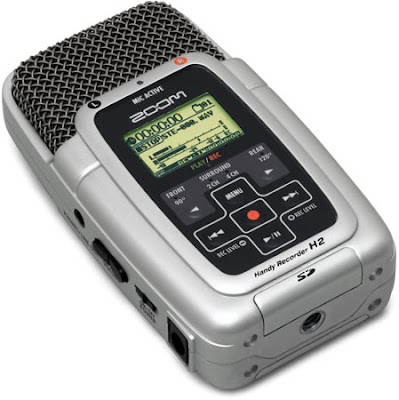
Consider this one of those "better late than never" type things. Zoom made a name for themselves in the early 2000's as a manufacturer of nicely made budget gear. Their early effects boxes weren't going to make Lexicon lose any sleep, but for dirt cheap, they opened up a nice range of effects in a single metal box to a whole array of bedroom musicians. The H2 (and the subsequent H4) Recorder has been out for some time now, and is something that has been on my wish list for a little while. On my last album, I got a bit back into sampling my own sounds from scratch again and started looking around for a decent, cheap solution for making field recordings. The H2 seemed like it had the right balance of features and reasonable price and looked to be a good starter level field recorder. So after getting back from my band's most recent tour last week, I decided to finally pick one up. What follows is less a proper review and more just some initial impressions. Make of them what you will, and if you're an H2 owner and disagree with something I've said here, by all means chime in.

If you've somehow missed it, the Zoom H2 is a portable audio recorder with an array of 2-4 built-in condenser mics (for stereo and surround recordings), that records to SD cards. What makes it most appealing is the price... generally between $140-$160 depending on where you shop. Mine was advertised as coming with only a 512MB card, but actually included a 1 GB card. Not sure of that is normal or if I just lucked out, but for my purposes - short recordings of real world sounds and not full length concert bootlegs - it's perfect.

My first impression upon opening the box was how cheap the Zoom H2 felt. It appears to be well-constructed enough, but is made out of the same super-light plastic some of the recent budget Korg effects have been. It may very well be durable, but it feels like it might just shatter to pieces if you gave it a good drop. So, that's definitely something to be wary of in a field recorder. That aside, my other first impression was that it was nice to see so many accessories included. You get a USB cable for connecting it to your computer, a wind screen, a very bare bones foot mount to act as a stand, some ear buds, a mic stand adaptor, a stereo Y-cable, and an AC adaptor. In an age where it is commonplace for companies to nickel and dime their customers to death by charging them piece by piece for accessories like these, it's nice to have them thrown in for free.

In addition to using the built-in mics in various patterns, the H2 also has an 1/8" stereo input for accepting line-level signals from devices like musical instruments, home stereos, etc. 3 different gain levels are available for recording signals of different strengths and there is even a compressor/limiter effect that can be called in for recording extremely high levels if necessary.

Most operations take place on an LCD screen about the size of a postage stamp. It's not always the most legible interface in the world, but because operations are relatively basic here, it doesn't take much getting used to. Options such as setting the bit depth and sample rates of your recordings (up to 24-bit/96k) are selected via the left and right arrow keys (rewind and fast-forward). This was a bit counter-intuitive when selecting items from bottom to top would've fit using the up and down keys a lot more logically, but aside from setting your input levels, you shouldn't have to venture into the menus too often anyway.

In addition to straight up field-recording duties, the H2 can also act as a USB mic for those of you looking to get into podcasting or screencasting, or as a tuner for bassists and guitarists. Very handy! Because of the USB, all of the recordings you make on your H2 can be directly transferred to your laptop where they can be easily edited and archived.

In practical use, I found the H2 to be pretty spectacular, especially considering the price. The mics, while no Neumann's by any stretch, sound very clear and detailed. Likewise, USB operation was simple and bug-free from my tests. I'll be using this on the screencast tutorials I hope to start adding to the site for sure. The only real issue, as I mentioned before, is the build quality. The lightness of the plastic body picked up rumble and 'body noise' like no one's business, so this is something you'll definitely want to mount on a stand or tripod of some sort versus just holding it in your hand. I have a little super-flexible 6" tripod set-up for my Flip video camera that does the trick very nicely.

Overall, I think this thing comes in on the right side of bang vs. buck by a pretty comfortable margin. I can't confirm that it's going to be perfect for every option out there, but for my initial round of sampling found objects, I was very impressed. I have yet to try any outdoors recordings, so I'll keep you posted on that, but in the meantime, I have absolutely no qualms recommending this to beginner field-recording enthusiasts such as myself. Dissenting thoughts from those of you with more experience with this than I are definitely welcome!