Monday, September 20, 2010

Using Logic's Speed-up to Create Rising/Uplifting Effects

One of the fun, but kind of gimmicky new features added in Logic 9 are the so-called "speed curves". These allow you to simulate the speeding-up or slowing down effects you would hear on a tape machine or record coming to a gradual start or stop. It can be useful as an effect, but honestly, it's not the sort of thing you'll use all the time lest people begin to think you're a one trick pony.

One other handy use that might give you more mileage is to use it to create rising "uplifts" to raise the energy level and excitement in a track as you transition from a verse to a chorus. Why not just program a pitch bend on the MIDI track? Aside from the fact that this effect sounds a little different (the speed is changing, not just the pitch), you can apply it to literally any piece of audio you want, which allows you to get much more creative and original than just imitating the famous THX logo effect.

To create this effect, load up a piece of audio, or render a softsynth track to audio. If it's a pitched sound, you'll want to make sure to record the note that you want it to finish or build to. Take care to make it the exact length you want it to be, too. Once you have your audio in place, click on the audio region to select it. In the upper lefthand corner of the arrange page is the region parameter box which contains options to loop, delay, and perform fade-ins and fade-outs. Click and hold down the FADE-IN text and a small menu will come up allowing you to select SPEED UP. On the line next to this, you can enter how long you want the speed up to take in milliseconds. For the most dramatic effect, you'll probably want to make this the length of the entire track, or close to it. Generally speaking, you can probably leave the CURVE value alone but feel free to experiment if a straight, linear curve doesn't do the trick for you.

Experiment with using different types of audio, like howling wind, a siren, or anything with a bit of tone to it. Sprinkling a little bit of delay on this track will make it sound a bit more dramatic as well. Of course, this trick will work in reverse if you want to bring the audio down in pitch for a sort of "powering down" effect... just use the SLOW DOWN selection on the second fade menu.

Moog Sonic 6 on Ebay


Info at the link...

Waldorf Microwave XT on Ebay


Info at the link...

Friday, September 17, 2010

Download 5 Tracks from Trent Reznors "Social Network" Score for Free

Pre-orders are open for Trent Reznor and Atticus Ross' score for "The Social Network", and to help promote it they're giving away a 5-track sampler. Check out Stereogum for the deets.

Free Sample Friday: Virus Dubstep Bass


We made it through another week, so it's free sample time! Today's selection is a dubstep-style bass sound (would probably work for drum n' bass, too) I made on my Access Virus B utilizing oscillator FM. 6 multi-sampled notes as mono 24-bit WAV files. Root key is in the file name as usual. Enjoy!

GO GET THEM!

360 Systems MIDI Bass on Ebay


Info at the link...

"Moog Musonics" Version Minimoog on Ebay


Rare version of the Minimoog (apparently less than 100 were made),

Info at the link...

Thursday, September 16, 2010

Review: Sample Magic Organic House


Product: SM19 Organic House
Format: Apple Loops, REX, Stylus RMX, plus Reason NNXT, Logic EXS-24, Kontakt 2, and Halion
Genre: House
Distributed by:
Sample Magic
Price: $74.90
Demo: Audio demos on product page.


If there's one thing you can say about electronic music, it's that it evolves at a dizzying pace. 25 or so years ago when house first started appearing in Chicago clubs, few could've predicted how drastically the genre would evolve, let alone how many sub-genres it would spawn. As essentially the 1980's answer to disco, it is perhaps not surprising that present-day house enthusiasts have brought that influence and sound into their modern arrangements, along with a healthy bit of evolution and innovation of their own. Organic House is a sample collection aimed at helping you create this new retro variant.

Organic House consists of several hundreds of loops divided into the following categories: Bass Loops, Combi Loops (complete pre-fab arrangements in several variations useful for quickly throwing together a track), Drum Loops, FX and FX Loops, Music Loops, Percussion Loops, Synth Loops, and Top Loops (hats, shakers, and the like without kicks). Additionally, a generous selection of one-shot samples give you access to a variety of kicks, snares, hats, percussion, hits, and snippets in your sampler format of choice.

Let's have a look at the loops first. All of the loops are two bars in length with some available at 125 BPM and others at 128. Of course, if you're using the REX2 versions of the loops, they are all generally usable over a reasonably wider range than that without too many terrible artifacts. When relevant, the key of the loop is also included for easy mixing and matching.

The Bass Loops get things off to a nice start with a really nicely varied range of sounds. You'll find gut-rumbling subs, dirty electric bass, punchy FM, and clean analog tones in abundance, so you're sure to find something to fit the mood of your track. The production is fantastic, and basically ready to drop into a track without additional processing (unless you want it). A nice balance between clarity and low-end rumble is perfectly maintained while successfully avoiding sonic mud. The basslines all fit comfortably within what one would expect from the classic house - repetitive, driving, and funky.

The Combi Loops are next. These are essentially completed tracks, broken down into 4 different variations which strip away or add elements, allowing you to arrange them as you see fit into a full track. These would probably best be utilized with the one-shot samples to add some more variation, as making an entire track out of 4 loops might prove a bit repetitive even for club music, but the quality is extremely high. The mixes are well balanced and the style is unmistakably authentic.

The Combi's are followed up by a heaping helping of Drum Loops. Instead of simply giving you a single loop, all of the drum loops here are offered in 3 variations, as well as a 'tops' variation that elimiates the kick drum. Very helpful! Style-wise, the loops mix stomping house kicks with elements of classic disco, African/Latin percussion, with a smattering of modern tech elements. Many of these would probably work quite well outside the confines of house in other types of club music as well. The production standard exhibited by the previous loops continues here. Everything sounds fantastic.

The FX and FX Loops section is made up of percussive loops with a somewhat glitchy/manipulated sound. The timbres used here are all familiar to the house genre, but the ways in which they are programmed and manipulated help lend the more current, modern sound of house. Lots of creative stuff here to add some unusual spice to your tracks.

The Music Loops are where the disco influence is most evident in this collection. Retro-strings, guitars, vocals, pianos, synth slap bass, and other classic sounds are all hyper-edited into funky rhythmic loops with one foot in the past and another firmly in the present day. If house is your thing, you'll find a lot to love here. The editing is all skillfully pulled off and very creative, often with multiple elements working together to create a more complex-sounding whole.

Percussion Loops follow this consisting mostly of various hand-percussion and Afro/Latin rhythms. The loops themselves are generally quite stripped down and deceptively simple, but when combined with some of the Tops loops, they spring to life and lend both funk and cred in abundance. These loops are also mostly bone-dry, so they are prime candidates for further processing and manipulation for musicians wanting to customize things a bit.

The Synth Loops mix vintage synth tones with jazzy Rhodes chords and a decidedly upbeat, cheery feel. Many of the loops make heavy use of filtering to take them out of their retro origins and into a more current sound. As before, the keys of each loop are listed in the loop name, so you can instantly find loops that will work together.

Lastly, we have the Top Loops. These range everywhere from spartan hi-hat loops to full-on 'everything but the kick' rhythms, so there's bound to be something useful to you here. Style-wise, these are about what you'd expect in a house music collection, but with the occasional unexpected element that makes your ears stand up and take notice.

This collection would be a fine value if all it consisted of was the loops, but Sample Magic has generously included some outstanding one-shots as well to help you get even more mileage out it. The sounds here are outstanding. Beautifully punchy kicks, chunky hats, chopped vocal and chord snippets, and spacey effects are all here. Indeed, just about any musician making club-oriented music would find these useful regardless of genre. The production quality is top notch, and those with "production phobia" needn't worry about adding a drop of additional processing. Everything is ready to go.

I'm not sure what else to really say about this library. I really couldn't find a single thing wrong with it, and the quality and attention to detail here is pretty spectacular. You won't find lots of useless filler or throwaway material here - just funky, creative loops with the unmistakable sound of house. [10/10]

Roland SH-2 with Case on Ebay


Info at the listing...

Nord Modular Keyboard on Ebay


Info at the listing...

Alesis Fusion with 80GB Hard Drive on Ebay


Info at the listing...

Tuesday, September 14, 2010

Everything is a Remix

Everything is a Remix from kirby1 on Vimeo.


"Remixing is a folk art but the techniques involved — collecting material, combining it, transforming it — are the same ones used at any level of creation. You could even say that everything is a remix.
everythingisaremix.info/​"

What is Pulse Width Modulation?


Earlier this year, I put together a modest, multi-part series of posts called Synthesis Made Simple aimed at helping the total noob learn some of the basics of programming his or her own sounds. I purposely left out some of the more advanced concepts in the interest of not making it completely overwhelming, so I thought I'd take the opportunity today to discuss one of those concepts that can be insanely useful: pulse width modulation.

Not every synth will offer pulse width modulation, although with the popularity of PWM sounds in trance, most modern virtual analogs and softsynths do. You'll recall in our discussion of modulation, that modulation is simply the act of changing some aspect of your sound in real time. So what about the 'pulse width' aspect of PWM? You may have heard square waves interchangeably referred to as 'pulse waves' before. This is because if you look at the severe up and down peaks in a squarewave, it has the appearance of a pulsing sound. The distance in between those peaks is called a 'duty cycle'. By changing (modulating) the duty cycle, we can alter the sound of the waveform as it goes from wide, retangular shapes to narrow, skyscraper-like shapes. Thus, pulse width modulation is the alteration of the duty cycle of your waveform for the purposes of changing the basic timbre of that waveform. Note that although some modern synths allow pulse width modulation of other types of waveforms, it is far more usual to only see this option available on the pulse/squarewave.

Let's explore this a bit and see what we can do with it, shall we? Go ahead and fire up your DAW of choice and call up an instance of TAL Bassline. (If you don't already have it, it's free and available here.) Bassline emulates the architecture of the Roland SH-101, a very popular monosynth in the 80's.

1. The first thing to do is to isolate our pulse wave, so go to the SOURCE MIXER and turn down the sliders for the SAW and SUB OSC. If you play a few keys, you should hear the familiar hollow timbre of the pulse wave.

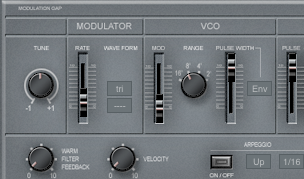
2. If you look next door in the VCO section, you will see a slider marked PULSE WIDTH. Go ahead and play some notes as you fiddle with this slider. As you push the slider upwards, you should hear the timbre change from the hollow square wave to something a bit more biting and nasal. You can probably already see some applications for this in emulating sounds like oboe, harpsichord, or even the buzzing of a gnat. But this is missing out on some of the more interesting stuff you can do with PWM when you assign a modulator to change that pulse width in real time.

3. You'll notice that next to that PULSE WIDTH slider is a menu that defaults to MAN for manual. This means that you can only change the pulse width by fiddling with the slider. Go ahead and change that to LFO (check here if you need to read up on what an LFO is). If you play a few notes now, it probably sounds pretty dissonant an unpleasant, so let's dial in some more subtle settings. Head over to the MODULATOR section (which is what Roland referred to the LFO as back then) and turn down the RATE slider to about 25%. Also, change the WAVE FORM to TRI. If you play a few notes now, you should hear a rather warm, fatter sounding timbre being produced. This is one of the cool things about PWM and why it was so common on early synths that might only offer a single oscillator. By using PWM, even single oscillator synths like the 101 could output thicker, fatter sounds. This, along with unison modes, is the basis for most of those giant sounding trance leads the kids love so much.

4. Of course, you're not just limited to using the LFO to modulate pulse width. Try going back to the VCO section and changing the modulator from LFO to ENV. This will allow you to modulate the pulse width using the ENVelope generator (read up on envelopes here). By altering the Attack and Decay of the envelope, you can simulate the way a plucked sound operates in the real world with a brighter attack portion settling into a more mellow decay or sustain. This can be useful in emulating instruments like guitars, or retro sounding 70's leads.

As you can imagine, when you get to more complex synths that offer multiple oscillators, the sounds you can make using PWM get even bigger, warmer, and more impressive and you can even use different methods for modulating the pulse width on each oscillator. Try experimenting with something simple like Bassline first, though. Once you've got a handle on that, try tackling it on a more advanced synth and see where it takes you!

Korg Micro Preset M500 on Ebay


Info at the listing...